
How-to: Select a Model#
This guide explains the differences between the four model classes in timflow.steady:
ModelMaq, Model3D, Model and ModelXsection. Understanding these differences
will help you choose the right model type for your groundwater flow problem.
import timflow.steady as tfs
ModelMaq#
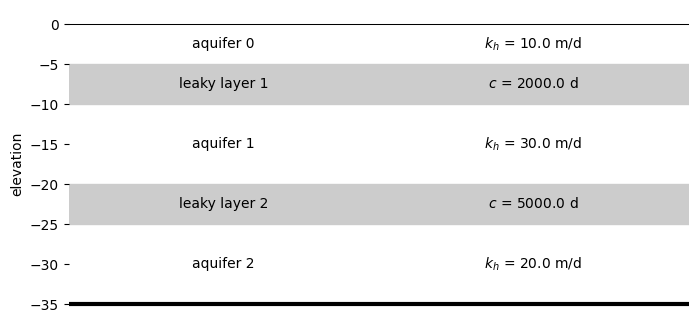
ModelMaq is a model consisting of a regular sequence of aquifer - leaky layer - aquifer - leaky layer, aquifer, etc. The top of the system can be either an aquifer or a leaky layer. The head is computed in all aquifer layers only.
ml = tfs.ModelMaq(z=[0, -5, -10, -20, -25, -35], kaq=[10, 30, 20], c=[2000, 5000])
Show aquifer summary
ml.aquifer_summary()
| layer | layer_type | H | k_h | c | ||
|---|---|---|---|---|---|---|
| # | ||||||
| background | 0 | 0 | aquifer | 5 | 10.0 | NaN |
| 1 | 1 | leaky layer | 5 | NaN | 2000.0 | |
| 2 | 1 | aquifer | 10 | 30.0 | NaN | |
| 3 | 2 | leaky layer | 5 | NaN | 5000.0 | |
| 4 | 2 | aquifer | 10 | 20.0 | NaN |
The figure below illustrates a ModelMaq example with three aquifers and two leaky layers:
ax = ml.plots.xsection(params=True, labels=True, units={"k": "m/d", "c": "d"})
ax.set_frame_on(False)
Model3D#
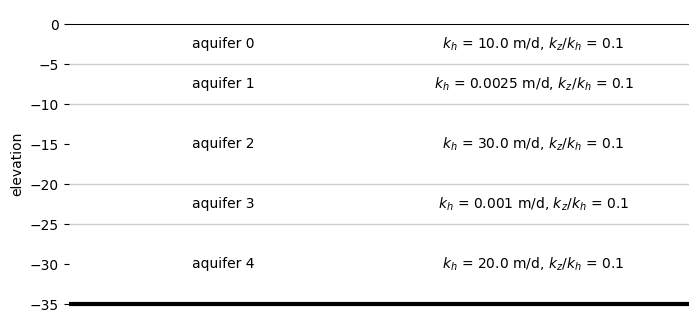
Model3D is a model consisting of a stack of aquifer layers. The resistance between the aquifer layers is computed as the resistance from the middle of one layer to the middle of the next layer. Vertical anisotropy can be specified. The system may be bounded on top by a leaky layer.
ml = tfs.Model3D(
    z=[0, -5, -10, -20, -25, -35], kaq=[10, 0.0025, 30, 0.001, 20], kzoverkh=0.1
)
Show aquifer summary
ml.aquifer_summary()
| layer | layer_type | H | k_h | c | kzoverkh | ||
|---|---|---|---|---|---|---|---|
| # | |||||||
| background | 0 | 0 | aquifer | 5 | 10.0 | NaN | 0.1 |
| 1 | 1 | aquifer | 5 | 0.0025 | 10002.5 | 0.1 | |
| 2 | 2 | aquifer | 10 | 30.0 | 10001.666667 | 0.1 | |
| 3 | 3 | aquifer | 5 | 0.001 | 25001.666667 | 0.1 | |
| 4 | 4 | aquifer | 10 | 20.0 | 25002.5 | 0.1 |
The figure below shows a Model3D example consisting of five layers all treated as aquifers with a vertical anisotropy of 0.1:
ax = ml.plots.xsection(params=True, labels=True, units={"k": "m/d", "c": "d"})
ax.set_frame_on(False)
Model#
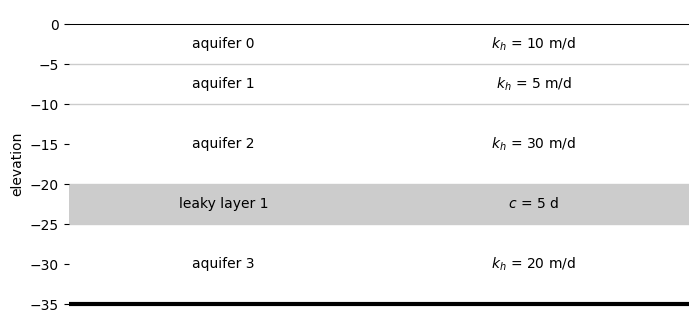
Model is a model consisting of an arbitrary sequence of leaky layers and aquifers. The resistance between all aquifers needs to be specified by the user. This is the most general option, but requires a bit more input.
ml = tfs.Model(
    z=[0, -5, -10, -20, -25, -35],
    kaq=[10, 5, 30, 20],
    c=[2, 5, 2000],
    npor=[0.3, 0.3, 0.3, 0.3, 0.3],
    ltype=["a", "a", "a", "l", "a"],
)
The figure below illustrates a Model example with four aquifers and one leaky layer:
ax = ml.plots.xsection(params=True, labels=True, units={"k": "m/d", "c": "d"})
ax.set_frame_on(False)
XsectionModel#
XsectionModel is a special model class for building cross-section models. The only
parameter you can pass to ModelXsection is the number of layers, which must be equal
for all sections.
ml = tfs.ModelXsection(naq=2)